Integrations & APIs
How SweepTag connects with external systems and services.
Lansweeper Integration
Overview
SweepTag integrates with Lansweeper to provide barcode generation for your entire IT infrastructure.
What's supported:
- ✅ Browse all Lansweeper assets across multiple sites
- ✅ Search assets with live search (debounced)
- ✅ View comprehensive asset details (30+ data points)
- ✅ Generate QR or Code 128 barcodes
- ✅ Link barcodes to Lansweeper URLs
- ✅ Create custom fields for barcode storage
- ✅ Multi-site queries with single PAT
- ✅ Automatic asset sync and caching
What's not supported (yet):
- ❌ Asset creation in Lansweeper from app
- ❌ Asset deletion from app
- ❌ Custom field deletion from app
- ❌ Direct field editing for Lansweeper assets
Authentication
SweepTag uses Personal Access Tokens (PAT) from Lansweeper.
Prerequisites:
- Lansweeper account with API access (not available on free tier)
- Administrative access to create PAT
To generate a PAT:
- Log in to Lansweeper (https://app.lansweeper.com)
- Click your name initials (top right corner) and go to Account settings
- Select Developer Tools in the left menu
- Click Add New API Client
- Select Personal Access Token (PAT) as the authentication method
- Name it (e.g., "SweepTag"), click Continue, and complete the form
- Copy the token
- Paste into SweepTag: Settings › Integrations › Lansweeper › Add connection — the wizard shows these same steps, then asks for a connection name and the token, and discovers your sites automatically
The Add connection wizard in the app walks you through all of this — you don't need to memorize the Lansweeper steps.
Security:
- PAT is stored locally on your device
- Never shared or sent to external servers
- If compromised, you can revoke it in Lansweeper
- Use a dedicated PAT for mobile app (separate from API scripts)
API Endpoints Used
SweepTag queries the Lansweeper GraphQL API at: https://api.lansweeper.com/api/v2/graphql
Operations performed:
GetSites- Discover authorized sitesGetAssets- List assets per site (paginated)GetAssetDetail- Full asset information (30+ fields)GetCustomFields- List available custom fieldsCreateCustomField- Add new custom text fieldsSaveAssetField- Write barcode values to custom fieldsGetSiteAssetsPage,SyncListAssets,SyncBatchDetails- Background paging and sync
Rate limiting:
- SweepTag respects Lansweeper rate limits (typically 1000 requests/min)
- Caching minimizes unnecessary API calls
- Sync is automatic (configurable interval)
Multi-Site Support
If your PAT has access to multiple sites, SweepTag auto-discovers them.
To see all sites:
- Go to the Assets tab — your authorized Lansweeper sites appear as chips along the top
- Tap a site's chip to browse its assets
To generate barcodes for many assets at once:
- Go to the Assets tab and open the site
- Tap Select and tick the assets (or select all)
- Tap "Generate N barcodes" — one barcode per selected asset
Custom Field Management
Lansweeper has many built-in fields, but some are read-only on cloud assets. SweepTag lets you create custom text fields.
To create a custom field:
- In SweepTag, go to Settings › Integrations › Lansweeper
- Tap "Create custom field"
- Enter a name (e.g., "Barcode ID")
- Select the site(s) to create the field on (pick one or more)
- Tap Create — the field is created on the sites you selected, and each shows its result (Created / Already exists / Failed)
Available field types in Lansweeper:
- Text (single line)
- Text (multi-line)
- Number
- Date
- Choice
- User
- Asset link
SweepTag creates: Text fields (simplest, most flexible)
Caching & Sync
SweepTag caches Lansweeper data locally for offline access.
What's cached:
- Asset lists (name, type, OS, owner, etc.)
- Asset details (full profiles with 30+ fields)
- Custom field definitions
What's NOT cached:
- Live Lansweeper UI data
- Real-time asset updates
Cache behavior:
- First open: SweepTag fetches latest from Lansweeper
- Subsequent opens (within refresh interval): Uses cached data (faster)
- After refresh interval expires: Auto-fetches fresh data (if online)
- Offline: Uses cached data (no errors)
Cache refresh settings:
- Location: Settings › Integrations › Lansweeper, under Asset cache › Refresh after (shown once a Lansweeper connection exists)
- Options: 1h, 6h, 12h, 24h (default), 72h — tap a chip and it applies immediately
To force a refresh:
- Go to the Assets tab and open the site
- Pull down on the asset list to refresh
- SweepTag fetches latest data
When your access token expires
PATs don't last forever. When SweepTag next tries to use an expired or revoked token it detects the rejection and:
- shows a "Lansweeper session expired" popup with an Update token action;
- flips the connection's status to Disconnected (red) on the Home screen and on Settings › Integrations (the row reads "Action needed · token expired").
To reconnect: tap Update token on the popup, the red badge on Home, or Update access token on Settings › Integrations › Lansweeper. Paste a fresh PAT — SweepTag validates it against Lansweeper and, on success, restores the connection. Your sites and cached data are kept (only the credential changes). A brief network drop does not disconnect you; only an actual token rejection does.
Troubleshooting Lansweeper Connection
Connection fails: "Invalid token"
- Verify PAT is correct (copy-paste from Lansweeper)
- Ensure PAT hasn't expired (if it has, use Update access token above — no need to remove the connection)
- Check that you have API access (not free tier)
Can't see my sites
- Verify PAT has access to the sites (check the API client in Lansweeper › Account settings › Developer Tools)
- Create a new PAT with broader permissions
- Try force-refreshing cache
Can't create custom field
- Ensure you have permission to create fields (admin access)
- Field name may conflict with existing field (try different name)
- Check internet connection
Assets show outdated data
- Manually refresh cache (see above)
- Wait for auto-refresh interval to pass
- As a last resort, remove the connection choosing Delete local data, then add it again
Scanning Lansweeper barcode doesn't show asset
- Ensure barcode was created with the App link link type (Settings › Integrations › Lansweeper)
- Asset may have been deleted in Lansweeper
- Try re-syncing cache
File Export Destinations
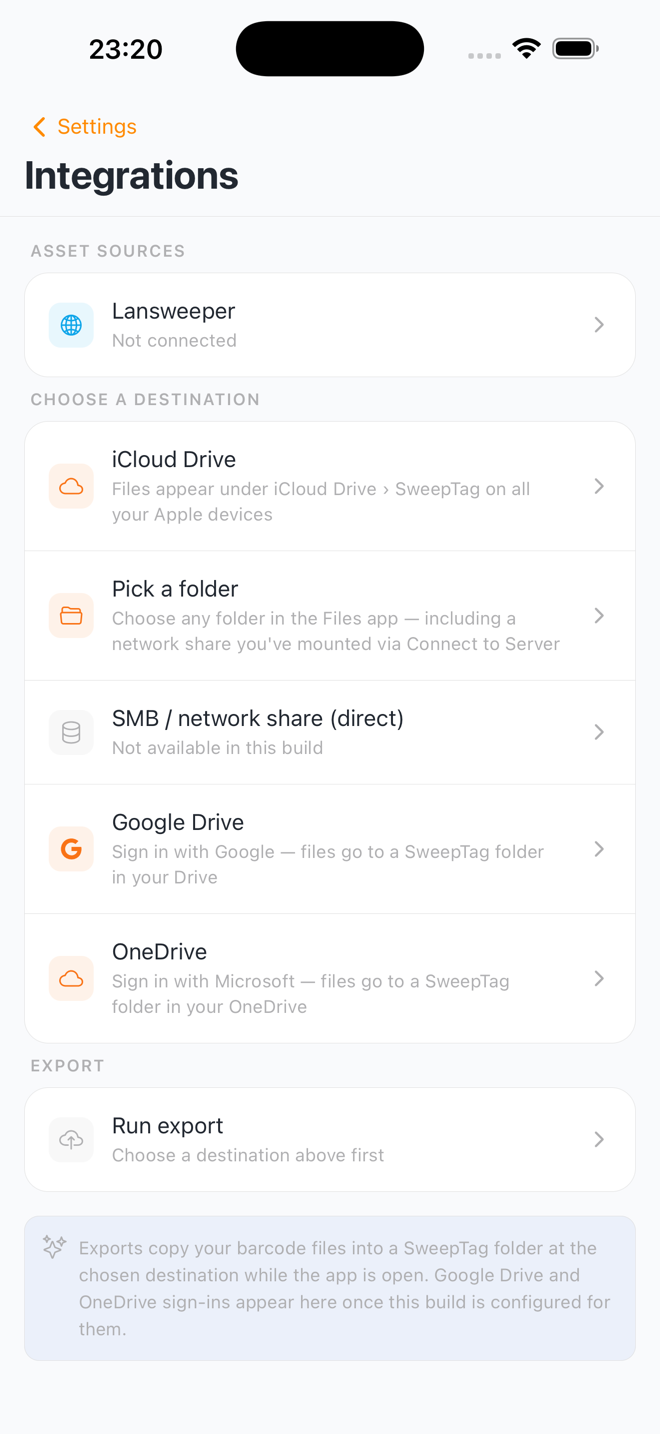
SweepTag can mirror your generated barcode files out to a destination you choose — a local folder, a network (SMB) share, or a cloud drive. This keeps a named, browsable copy of every code and label PDF outside the app, so other people and systems can use them.
Set this up in Settings › Integrations, under Choose a destination. Running an export lives on the same screen, under Export › Run export.
Available destinations
| Destination | Platform | What it is |
|---|---|---|
| SMB / network share (direct) | iOS & Android | Connect straight to a NAS or file server from SweepTag — you enter the server, share, and account yourself. No Files-app setup needed |
| Pick a folder | iOS & Android | Any folder you pick from the Files app (iOS) or the system picker (Android), including a share you've already mounted there |
| iCloud Drive | iOS | Files appear under iCloud Drive › SweepTag on all your Apple devices |
| OneDrive | iOS & Android | Sign in with Microsoft; files go to a SweepTag folder in your OneDrive |
| Google Drive | iOS & Android | Sign in with Google; files go to a SweepTag folder in your Drive |
Network share (SMB)
Use this for a NAS (Synology, QNAP, TrueNAS…), a Windows share, or a Samba server. SweepTag speaks SMB 2 and SMB 3 directly — the legacy SMB 1 protocol is not supported, which is correct for any current server.
You'll need: the server address (nas.local or 192.168.1.20), the
share name (e.g. backups), and an account with write access.
Optionally a folder inside the share, a domain, and a non-standard port.
Test & save connects to the share, creates the target folder and writes a temporary probe file before anything is stored — so a typo, a wrong password, or a read-only share is reported there and then, not on your first export.
Your password is kept in the device keychain (Keychain on iOS, Keystore on Android), marked so it never travels in an encrypted device backup. It is never written to the export config, the activity log, or a support copy of the log.
Both devices and servers must be on the same network — SweepTag doesn't dial out through a VPN for you. If the share is only reachable on the office network, exports will fail from elsewhere until you reconnect.
OneDrive and Google Drive sign in with your Microsoft/Google account and require the installed app (they don't work in the web preview). They're the newest destinations — a folder or iCloud is the most battle-tested choice.
How the export behaves
- One-way mirror. SweepTag writes app → destination. It's not a two-way sync; changing or deleting a file at the destination just makes SweepTag re-write it on the next export.
- Managed
SweepTag/subtree. Everything lands inside a single app-ownedSweepTag/folder. SweepTag only ever touches files it created there — a file it didn't write is never overwritten or deleted. - Only changes are written. Each run compares against what it exported last time and writes just the new or changed files.
- One device per destination. The first device to export into a folder claims it with a hidden
SweepTag/.sweeptag-export.jsonmarker. Another device pointed at the same folder is refused, so two devices can't clobber each other's files. To hand the folder over, delete that marker file — SweepTag tells you exactly this if it happens. - Runs while the app is open. There's no background export; open SweepTag to push the latest files.
Setup
- Go to Settings › Integrations and tap a destination under Choose a destination
- For SMB / network share (direct), fill in the server, share and account, then tap Test & save
- For Pick a folder, pick it in the system picker (on iOS, choose Grant long-term access so it survives an app restart)
- For OneDrive / Google Drive, complete the Microsoft / Google sign-in
- Tap Run export (in the Export section of the same screen), then Export now; files appear in the destination's
SweepTag/folder
If an export fails, turn on Debug mode (Settings › Advanced) and check the activity log — it names the exact cause (expired folder access, a claim held by another device, a cloud permission problem). See FAQ › An export failed.
Local Collection System
Supported Field Types
SweepTag supports 9 field types for local collections:
| Type | Use Case | Example |
|---|---|---|
| Text | Single-line values | "Serial Number", "Model", "Owner" |
| Multiline | Long text descriptions | "Notes", "Description", "History" |
| Number | Numeric values | "Price", "Quantity", "Year" |
| Date | Calendar dates | "Purchase Date", "Warranty End", "Last Service" |
| Choice | Dropdown selection | "Status: New/Used/Damaged", "Location: Site A/B/C" |
| URL | Web links | "Product Page", "Manual Link", "Support URL" |
| Email addresses | "Owner Email", "Support Email" | |
| Phone | Phone numbers | "Support Number", "Asset Owner Phone" |
| Checkbox | True/False toggle | "Under Warranty?", "Recently Serviced?" |
Field Groups
Organize related fields together.
Use case example:
- Group: "Warranty Information"
- Warranty Status (choice)
- Warranty Expiration (date)
- Warranty Provider (text)
Benefits:
- Cleaner UI when editing assets
- Logical organization
- Easier to find related information
Data Export
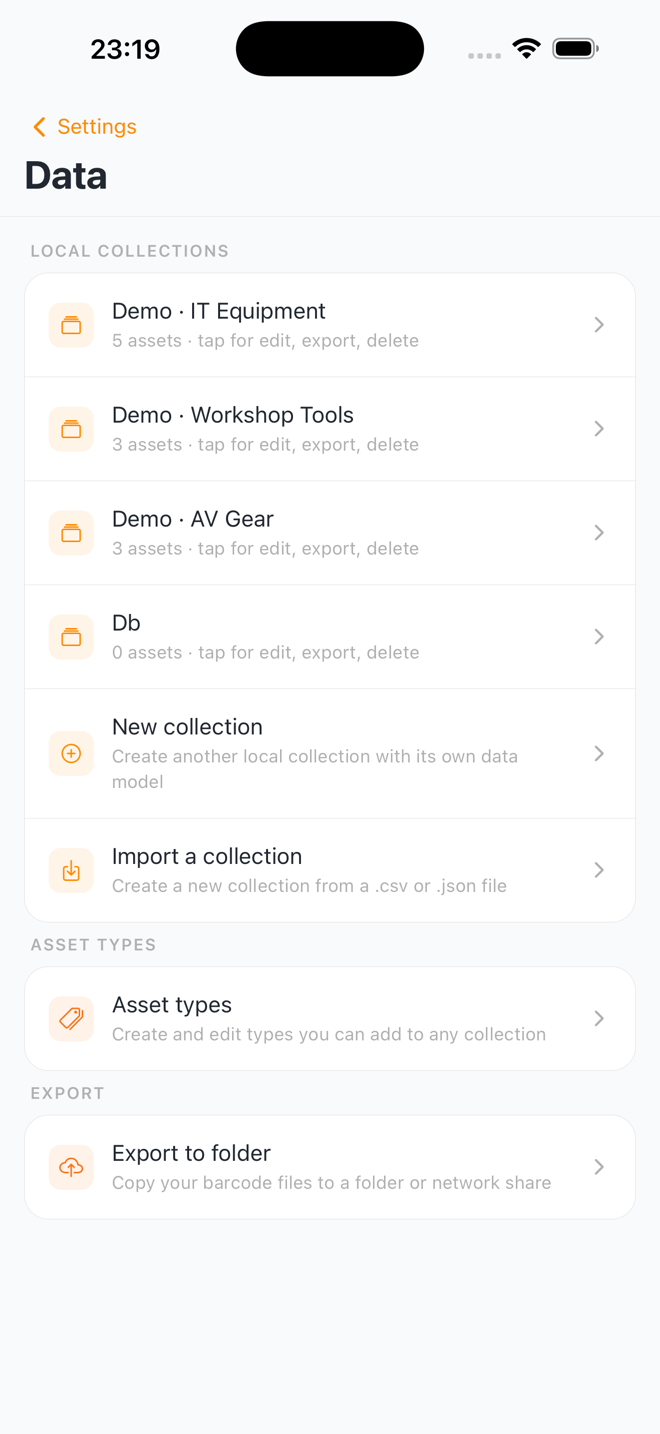
Export your local assets as CSV or JSON.
CSV export:
- Opens in Excel, Google Sheets, etc.
- One row per asset
- One column per field
- Easy for data analysis or backup
JSON export:
- Preserves full structure and data types
- For data migration or backup
- Readable in any text editor
Backup & Recovery
On-device storage:
- SweepTag saves all data locally, in the app's private storage
- Uninstalling the app deletes everything — collections, barcodes, scan history, and connections do not survive a reinstall
- Export a CSV or JSON backup before uninstalling or switching devices
Manual backup:
- Go to Settings › Data
- Tap your collection
- Choose Export CSV or Export JSON
- Save file to email, cloud storage, or device
Recovery from backup:
- Go to Settings › Data
- Tap Import a collection — SweepTag recreates the collection from your file (a JSON export restores the full data model; a CSV creates a field per column)
- Or, to restore into an existing collection: tap the collection, then Import CSV / JSON
- Select your CSV/JSON backup file
- SweepTag imports all assets
Deep Linking
SweepTag supports deep links for direct navigation.
URL scheme: sweeptag://
Supported links:
sweeptag://asset?siteId=<siteId>&assetKey=<assetKey>- Open a Lansweeper asset's detail pagesweeptag://local-asset?inventoryId=<collectionId>&assetId=<assetId>- Open a local asset's detail page (QR codes may carry extra field values as additional parameters)
Examples:
- From website:
<a href="sweeptag://asset?siteId=abc123&assetKey=A1B2C3">View in SweepTag</a> - From email: Click link to open app directly to asset
- From QR code: barcodes generated with the App link setting encode these links automatically — scanning one with any camera or scanner app opens the asset in SweepTag
Use cases:
- Customer self-service: Embed link in documentation
- Cross-app integration: Link from other apps to SweepTag
- Workflows: Deep-link straight to specific assets
Planned Integrations
Graphiti (Temporal Knowledge Graph)
Timeline: Roadmap
Purpose: AI-powered asset queries
Examples:
- "Which laptops are past warranty?"
- "Show me all assets in Building A with 8+ GB RAM"
- "Which devices haven't been scanned in 30 days?"
Status: In development, not yet available.
Cloud Sync
Timeline: Roadmap
Purpose: Two-way sync of collections across devices and team members
Examples:
- Share and co-edit inventory across a team
- Edit on phone, access on tablet
- Real-time collaboration
Status: Planned feature, not yet available.
Note: One-way file export to iCloud, OneDrive, and Google Drive already ships today — see File Export Destinations. Cloud Sync here refers to the collection data itself syncing both directions, which is still on the roadmap.
Credential Storage
Timeline: Roadmap
Purpose: Secure encrypted storage of Lansweeper PAT
Current: PAT stored locally on device
Future: Encrypted vault, recovery options
Status: Security enhancement planned.
Advanced Reporting
Timeline: Roadmap
Purpose: Generate reports from scan/barcode data
Examples:
- Weekly asset audit reports
- Barcode generation statistics
- Scan activity by user/date/asset
- Compliance documentation
Status: Planned feature, not yet available.
API for Developers (Future)
SweepTag does not currently expose a public API, but this is planned.
Future API would support:
- Export barcode data programmatically
- Create/manage assets via API
- Query scan history
- Integrate SweepTag with your systems
Status: Under consideration for future release.
Troubleshooting Integrations
Lansweeper
See Troubleshooting Lansweeper Connection above.
Local Collections
Can't import CSV
- Verify the column headers — they're matched to fields by field name, by group-qualified name (
Group / Field), or by what the field is used as (e.g.Serial number) - Ensure no encoding issues (save as UTF-8)
- Check that required fields (Name) are present
Data lost after reinstalling app
- Data lives only in the app's private storage, so uninstalling removes it — this is expected
- There is no way to recover it after a reinstall
- Before uninstalling or switching devices, export each collection: Settings › Data › tap the collection › Export CSV / Export JSON
Export file won't open in Excel
- Ensure CSV is saved with UTF-8 encoding
- Try opening as "Text" file and specifying CSV format
- Check that column count matches field count
Data Privacy & Security
What Data SweepTag Sends
Sent to Lansweeper API only (when connected):
- Asset queries (requesting asset data)
- Custom field creation requests
- Barcode value write-backs
- Your Personal Access Token (via HTTPS)
Sent to your chosen export destination (only if you set one up):
- Your generated barcode files and label PDFs, copied to the folder, SMB share, iCloud, OneDrive, or Google Drive you connected
- For OneDrive/Google Drive, these go to your own account over their HTTPS APIs; SweepTag requests only the scope it needs (write to files it creates)
Sent to SweepTag servers:
- None (there is no SweepTag server, account, or analytics)
Stored on your device:
- Local collection assets (in the app's private on-device storage, isolated from other apps by the operating system — see Data, Privacy & Reset)
- Lansweeper asset cache
- Barcode history
- Scan history
- Settings and preferences
What SweepTag Does NOT Do
- ❌ Does not phone home or send analytics
- ❌ Does not share data with third parties — except copying barcode files to an export destination you explicitly connect (a folder, iCloud, OneDrive, or Google Drive)
- ❌ Does not sell user data
- ❌ Does not require account creation
- ❌ Does not track location — scans are logged with date, time, and value only, never where you were
- ❌ Does not access contacts, photos, or other personal data
Data Retention
Local data: Stored indefinitely until deleted by user
Cache data: Re-fetched when older than the Refresh after window; deleted if you remove the connection and choose Delete local data
Scan history: The most recent 500 scans are kept; individual scans can be deleted in Scan History
Barcode history: Stored indefinitely (barcodes can be deleted from the Codes tab)
Resetting Your Data
To clear all data:
- Go to Settings › Advanced, under Reset
- Tap Reset app
- Read the warning and tap Continue
- Type
deletein the box, then tap Reset app
This removes:
- All settings
- All local collection assets (if not exported)
- All scan history
- All barcode history
- Lansweeper connections and file-export sign-ins (the stored PAT and OneDrive/Google Drive tokens)
Files already exported to a folder or cloud are not deleted. See Data, Privacy & Reset for the full reset details.
Performance & Limitations
Asset Browsing
- Browse page size: ~25-30 assets fetched per page as you scroll
- Background sync page size: 200 assets per page
- Search results: No fixed cap (bounded by what the site returns)
- Pagination: Cursor-based (efficient for large datasets)
- Performance: Instant search with 400ms debounce
Barcode Generation
- Batch generation: No fixed limit — every selected asset gets a barcode in one pass
- Generation speed: Varies by device
Printing
- Simultaneous print jobs: 1 (sequential printing)
- Label sizes: 3 standard (small, medium, large)
- Custom sizes: Supported via printer settings
Caching
- Asset cache size: No hard limit — bounded by device storage
- Max scan history: The most recent 500 scans are kept automatically
- Cache retention: Per configured refresh interval
Multi-Collection Support
- Maximum local collections: No limit (device storage dependent)
- Maximum assets per collection: No limit (device storage dependent)
- Maximum Lansweeper connections: No practical limit
Roadmap Integration Status
See Limitations & Roadmap for planned features and timeline.