Frequently Asked Questions (FAQ)
Answers to common questions about SweepTag.
Getting Started
Q: Is SweepTag free?
A: Pricing and availability are determined by your organization. Check your app store listing for current pricing.
Q: What devices are supported?
A: iOS 15.1+ (iPhone, iPad) and Android 7+ (phones, tablets).
Q: Do I need an account to use SweepTag?
A: No account required for local collections. For Lansweeper, you need a Lansweeper account with API access (paid tier).
Q: Can I use SweepTag offline?
A: Yes! Local collections work fully offline. Lansweeper assets show cached data when offline; new queries require internet.
Q: How much storage does SweepTag use?
A: Typically 50-200 MB depending on number of assets and cached Lansweeper data. Removing a Lansweeper connection (and choosing Delete local data) frees its cached data.
Q: Can I try SweepTag before adding my own data?
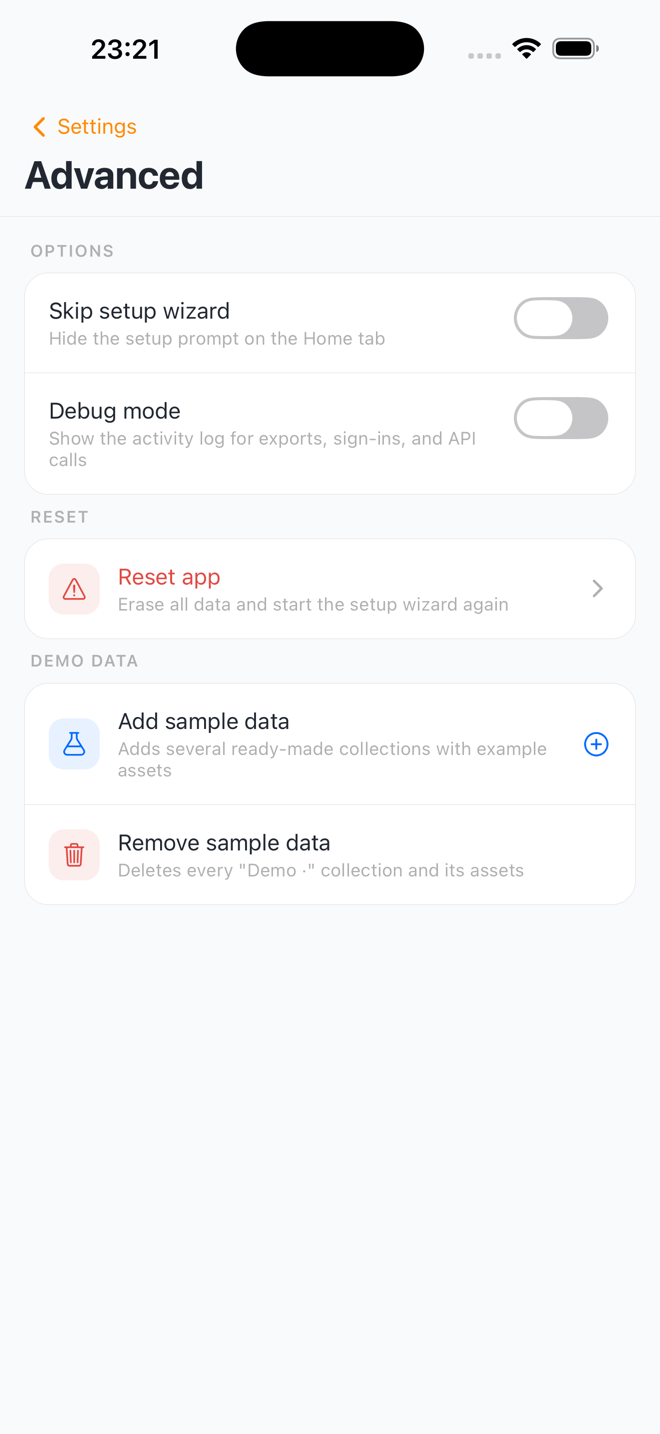
A: Yes. Go to Settings › Advanced › Demo data and tap Add sample data — you get five demo collections full of example assets to explore. When you're done, Remove sample data deletes them again without touching your own collections.
Barcodes
Q: What's the difference between QR Code and Code 128?
A:
- QR Code: Encodes URLs and full data; scannable with any smartphone camera; larger
- Code 128: Encodes numbers/text; scannable with barcode guns; more compact
See Feature Guides › Barcode Generation for details.
Q: Can I change what a barcode encodes after creating it?
A: Not directly. You can regenerate with different settings, but existing barcode labels stay the same. Generate a new barcode with updated settings if needed.
Q: How do I encode a custom value (not asset name)?
A: Use the Custom URL link type and set your URL pattern. Example: https://mysite.com/assets/{assetKey} — the {assetKey} placeholder is replaced by the asset's key. In a local collection's Barcode setup, you also choose which field acts as the asset key.
Q: Can QR codes link to my own website?
A: Yes. Use Custom URL link type and enter your URL pattern. When scanned, the QR code opens your URL.
Q: How secure is the barcode data?
A: Barcodes encode public data (asset IDs, names, URLs). If you need to encode sensitive data, use your own barcode encoding system.
Q: Can I regenerate barcodes if I change settings?
A: Yes. Go to Settings › Barcode, change the settings, then regenerate: in the asset list tap Select › tick the assets › Barcodes — when every selected asset already has a barcode, SweepTag offers to Regenerate them. (For a Lansweeper asset, open it and tap Regenerate.)
Q: Can I make a QR code that isn't tied to an asset?
A: Yes. In the Codes tab, tap Create › Standalone code to create a Wi-Fi, link, or text QR without an asset. These live under My codes and can be previewed, printed, and shared like any other code. You can also Edit or Delete one later from its code preview — editing regenerates the code from the new details.
Q: Can SweepTag make a Wi-Fi QR code?
A: Yes — create a standalone Wi-Fi code (Codes › Create › Standalone code), or add the built-in Wi-Fi network asset type to a collection. Scanning the code with a phone's camera app offers a one-tap "Join network." The password is stored/printed in plain text, so it's best for guest networks.
Printing
Q: My printer isn't showing up. What do I do?
A:
- Ensure printer is on the same Wi-Fi network as your device
- Check printer has AirPrint enabled (iOS) or is network-discoverable (Android)
- Restart printer and device
- Try a different Wi-Fi network
Q: What paper should I use for printing?
A: Thermal label rolls (4" × 6") are ideal, but any label paper or regular paper works.
Q: Why is my barcode blurry after printing?
A:
- JPEG format: Lossy compression can blur barcodes. Use PNG or SVG instead
- Printer quality: Ensure printer is set to high quality
- Resolution: Use high DPI setting (300+ DPI recommended)
Q: Can I print to a non-networked printer?
A: Only AirPrint (iOS) and network printers (Android) are supported. USB printers aren't supported in SweepTag.
Q: How many labels can I print at once?
A: No limit. You can print 1, 10, 100, or 1000 labels in a single batch.
Q: Can I save a barcode to PDF instead of printing?
A: Yes, two ways: in the print dialog, save the label as a PDF instead of sending it to a printer; or set a source's barcode file format to PDF (Settings › Barcode) and export the files to a folder or cloud destination (Settings › Integrations).
Scanning
Q: What barcode formats can SweepTag scan?
A: QR codes, Code 128, Code 39, EAN, UPC, and more. Any barcode your device camera can detect.
Q: Why won't my barcode scan?
A:
- Ensure good lighting (barcode needs to be clearly visible)
- Hold steady (avoid shaking)
- Try different angle (perpendicular to barcode works best)
- Check barcode quality (scratched or faded barcodes are hard to scan)
- Clean camera lens (dust can reduce scan accuracy)
Q: Can I scan barcodes without adding them to a collection?
A: Yes. Go to Scan tab and scan any barcode. Result shows immediately, scan is logged in history.
Q: Do scans require internet?
A: No. Scans work fully offline and are logged locally.
Q: Where are my scans stored?
A: Scan history is stored locally on your device (not uploaded anywhere).
Q: Can I delete specific scans?
A: Yes. Open Scan history (Home › Recent scans › See all, or Settings › Scan History) and tap the trash icon on a scan to delete it.
Q: How long is scan history kept?
A: SweepTag keeps the most recent 500 scans automatically — once you pass 500, the oldest scans drop off as new ones are added. You can also delete scans yourself at any time. To keep a copy, export the history first (share icon in Scan history › Export scan history › CSV or JSON).
Lansweeper
Q: How do I connect SweepTag to Lansweeper?
A: See Getting Started › Connect to Lansweeper for step-by-step instructions.
Q: What Lansweeper tier is required?
A: Lansweeper Professional or higher (API access required). Free tier doesn't support API.
Q: Where do I find my Lansweeper API URL and PAT?
A: SweepTag only needs a PAT — there's no API URL to enter.
- Log in to Lansweeper (https://app.lansweeper.com)
- Tap your initials → Account settings → Developer Tools
- Choose Add New API Client and copy the token it gives you
- Paste it into SweepTag's Add connection wizard (the wizard shows these steps too)
Q: Is my PAT safe?
A: Yes. PAT is stored locally on your device and never shared with SweepTag servers. If compromised, revoke it in Lansweeper settings.
Q: Can I connect multiple Lansweeper instances?
A: Yes. Go to Settings › Integrations › Lansweeper, tap Add connection for each instance.
Q: Why can't I create a custom field in Lansweeper?
A:
- Check that you have admin access in Lansweeper
- Ensure the field name doesn't conflict with existing fields
- Verify internet connection is active
Q: How do I write barcode values back to Lansweeper?
A:
- Create a custom field (via SweepTag)
- Configure barcode encoding to write to that field
- When you generate barcodes, values auto-write to Lansweeper
See Feature Guides › Custom Field.
Q: My Lansweeper connection fails. What do I do?
A:
- Verify PAT is correct (copy-paste from Lansweeper)
- Check PAT hasn't expired (create new in Lansweeper if needed)
- Verify API access is enabled (not free tier)
- Check internet connection
- Still stuck? Remove the connection (trash icon on its card) and add it again with a fresh PAT
Q: How often does SweepTag sync with Lansweeper?
A: Cached asset data refreshes after the interval you pick under Settings › Integrations › Lansweeper › Asset cache › Refresh after — 1, 6, 12, 24, or 72 hours (24 hours by default). You can also pull down on an asset list to refresh anytime.
Local Collections
Q: How many collections can I create?
A: No limit. Create as many as you need (device storage dependent).
Q: Can one collection hold different kinds of assets (computers, monitors, tools)?
A: Yes. A collection has shared fields for every asset, plus asset types that each add their own extra fields. The asset list gets filter chips per type. See Asset Types.
Q: How do I back up my local collection?
A: Go to Settings › Data, tap the collection, and choose Export CSV or Export JSON — then share the file to email, cloud storage, or your device.
Q: Can I restore a collection from backup?
A: Yes. Go to Settings › Data and tap Import a collection to recreate it from your CSV or JSON backup file — or tap an existing collection and choose Import CSV / JSON to bring the assets into it.
Q: Can I import assets from a spreadsheet?
A: Yes. Save your spreadsheet as a CSV file, then go to Settings › Data: tap a collection and choose Import CSV / JSON to add the assets to it, or tap Import a collection to create a brand-new collection from the file. Columns are matched to your fields by name.
Q: How do I filter or sort a long asset list?
A: Open the collection in the Assets tab and tap the filter button (sliders icon) next to the search box. The Filter & sort sheet lets you sort by date added, last updated, name, or any field, and filter by barcode, date added, missing unique IDs, and your own fields — choices, checkboxes, number and price ranges, and dates (warranty dates get Expired / Expiring presets). The button shows how many filters are active; Clear all removes them.
Q: Can I delete a collection?
A: Yes, but it's permanent. See Feature Guides › Deleting a Collection.
Q: Can I share a collection with my team?
A: No live sharing yet — cloud sync is planned. For now, export the collection as CSV/JSON and send the file; a teammate can recreate it via Settings › Data › Import a collection.
Q: What happens if I reinstall SweepTag?
A: Uninstalling deletes all local data, so reinstalling starts fresh. Before uninstalling or switching devices, export each collection (Settings › Data › tap the collection › Export CSV / Export JSON) — you can re-import via Settings › Data › Import a collection.
Customization
Q: How do I change the barcode format?
A:
- Default for new collections: Settings › Barcode › Default configuration
- Per collection: Settings › Barcode › tap the collection under Collection configurations (the format applies to every barcode in that collection — there's no per-barcode format choice)
Q: Can I customize the file naming?
A: Yes. Go to Settings › Barcode and tap your collection — under Name from, pick the parts of the file name in order and choose a separator. Only fields marked required or unique identifier can be used (plus Asset id and Collection), so file names stay present and identifying. Empty values are skipped; a file that would end up nameless falls back to the first field with a value, then the asset's id.
Q: How do I organize barcodes into folders?
A: In Settings › Barcode: the Default file structure card sets the app-wide grouping (flat or by format), and tapping a collection lets you group its barcodes by format, asset type, or a field of your choice.
Q: Can I set custom page margins for printing?
A: No — the printed page follows the Label size you pick in Settings › Printing (Small, Medium, or Large). There's no separate paper-size or margin setting.
Q: Can I change the app theme?
A: Settings › Appearance › Theme. Choose Light, Dark, or System.
Q: Can I change how dates are shown?
A: Yes. Settings › Formats › Date format — choose ISO (2024-11-30), Day/Month/Year, Month/Day/Year, or Long (30 Nov 2024). Dates you type are understood in any common order and displayed everywhere in your chosen format.
Q: Can I change the currency for price fields?
A: Yes. Set the app-wide default in Settings › Formats › Default currency (12 currencies, Euro by default). Each price field on an asset form also has its own currency chip, so an individual asset can use a different currency.
Performance & Issues
Q: SweepTag is slow. What do I do?
A:
- Restart app: Close completely and reopen
- Free device storage: Low storage can slow performance
- Reduce collection size: Archive or delete old data
- Stale Lansweeper data? It refreshes automatically per your Refresh after setting (Settings › Integrations › Lansweeper), or pull down on the list to refresh now
Q: App crashes when generating barcodes. Why?
A:
- Low device storage space (free up space)
- Too many barcodes at once (try smaller batches)
- Restart app and try again
Q: Lansweeper asset list loads very slowly.
A:
- Try a search to narrow results
- Use pagination to load smaller batches
- Pull down on the list to re-sync
- Check internet connection speed
Q: Scan history is growing too large. How do I clean up?
A:
- Want a copy first? In Scan history, tap the share icon in the header › Export scan history › Export CSV or Export JSON
- Then delete the scans you no longer need (trash icon on a scan)
Data & Privacy
Q: Where is my data stored?
A: All data is stored locally on your device, and nothing is uploaded to any SweepTag server (there isn't one). The one exception is File Export: if you connect a destination, SweepTag copies your barcode files to it — a folder, SMB share, iCloud, OneDrive, or Google Drive (your own account). That's opt-in and only sends the barcode files. See Data, Privacy & Reset.
Q: Does SweepTag track my location?
A: No automatic tracking. Manual scan logging shows timestamp, not location.
Q: Does SweepTag collect analytics?
A: No. SweepTag does not track usage or send data anywhere.
Q: Can I export all my data?
A: Yes. Collections export as CSV/JSON from Settings › Data (tap the collection), and scan history exports as CSV/JSON from Scan history (share icon › Export scan history). To keep the barcode files mirrored automatically to a folder or cloud drive, set up a destination under Settings › Integrations › Choose a destination (a folder, SMB network share, iCloud, OneDrive, or Google Drive) — see Feature Guides › Exporting to a Folder or Cloud.
Q: What happens if I uninstall SweepTag?
A: Uninstalling deletes all local data — collections, barcodes, scan history, and Lansweeper connections. Export your collections first (Settings › Data › tap the collection › Export CSV / Export JSON) so you can re-import them later.
Q: Is my Lansweeper PAT secure?
A: Yes. PAT is stored locally, never sent to external servers. If compromised, revoke in Lansweeper settings immediately.
Compatibility
Q: Does SweepTag work with...?
- Desktop/web version? No. Mobile only (iOS/Android).
- Windows/MacOS? No. Mobile platforms only.
- Wearables (Apple Watch)? Not yet. Planned for future.
- External barcode scanners? Yes. Any Bluetooth barcode scanner works.
Q: Can I sync across multiple devices?
A: Not yet. Cloud sync is planned. Currently: export/backup, then import on other device.
Q: Does SweepTag work with other IT management systems?
A: Yes, via custom URL barcode encoding. Link to any system's asset page.
Still Have Questions?
- Not finding your answer? Check Feature Guides or Configuration Reference
- Technical issue? Enable Debug Mode (Settings › Advanced › Debug Mode) and check logs
- Feature request? Submit feedback via app settings
Troubleshooting Workflow
Issue: Feature doesn't work as expected
- Check internet connection (if using Lansweeper)
- Restart the app (close completely and reopen)
- Restart device
- Update app (check app store for latest version)
- Enable Debug Mode and check logs for errors
- Uninstall and reinstall app (last resort — export your collections first, since uninstalling deletes all local data)
If issue persists, enable Debug Mode, collect logs, and contact support. Most settings screens also have a circled ? button in the header that opens the matching help article.
Issue: An export to a folder, share, or cloud account failed
- Go to Settings › Advanced and turn on Debug mode. Activity is recorded even while debug mode is off, so the failed run is already in the log.
- Filter to the ERROR level, or to the EXPORT, FILES, CLOUD, or AUTH source, to find the failure.
- Tap the entry to expand it — the detail carries the underlying cause, including the error text the cloud provider returned.
- Tap Copy and paste the log into your support message. Tokens and passwords are stripped automatically, so it is safe to share.
Common causes the log will name directly:
| What you'll see | What it means |
|---|---|
| "folder access may have expired" | The folder grant was revoked or the share isn't mounted — re-pick it in Settings › Integrations |
| "already used by SweepTag on another device" | Another device claimed that folder; pick a different one or remove .sweeptag-export.json |
| "not created by SweepTag" | A file of that name was already there; SweepTag never overwrites files it didn't write |
| "signing SHA-1 … not registered" | Android Google sign-in — the build's certificate isn't on the Google OAuth client |
| "without long-term access" | iOS folder picked without a bookmark; access will be lost on restart — pick it again |